An Image Generator Tuned to Myntra's On-Model Fashion Standards
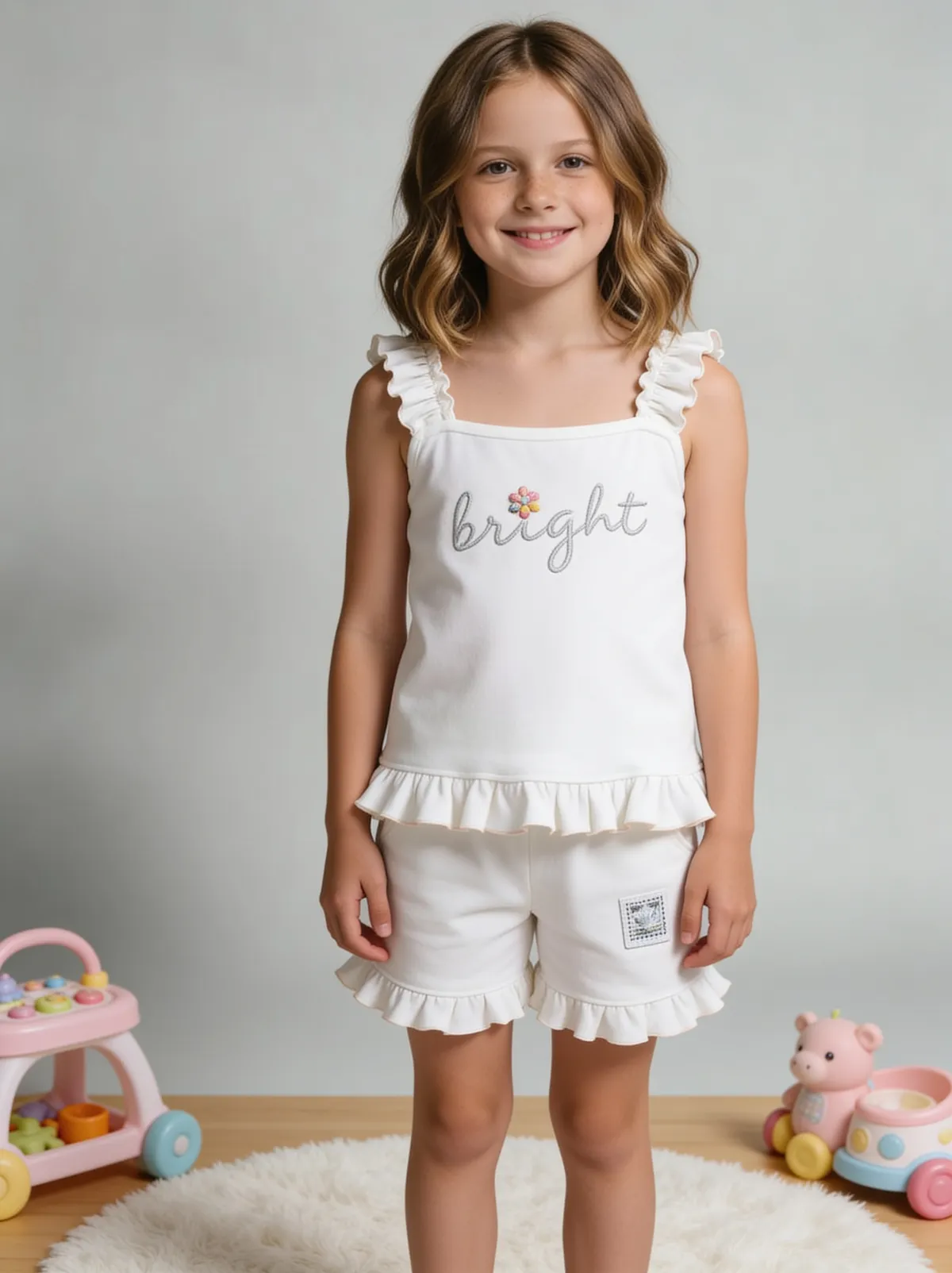
Myntra and similar Indian fashion marketplaces lean far more heavily on on-model imagery as a baseline expectation than general marketplaces do — a flat-lay-only apparel listing routinely under-performs against competitors showing the same garment worn and styled. Fluxx.work generates images tuned to that specific expectation: on-model shots generated directly from your existing garment photography, without booking a live model shoot.
Last updated:
Real output from Fluxx.work
Generated from a single uploaded product photo — Fashion & apparel
See more examples in the Fluxx.work gallery
Why on-model isn't optional in Indian fashion marketplaces the way it might be elsewhere
Fit, drape, and how a garment sits on a body are central purchase considerations for fashion shoppers on platforms built around browsing styled looks, not just isolated product specs — this is a different buyer expectation than, say, an electronics or home-goods marketplace where a flat catalog shot is perfectly normal. A garment shown only flat or on a ghost mannequin leaves exactly the information a Myntra shopper is looking for — how it actually drapes and fits a body — unanswered, which shows up as lower conversion relative to competitors who do show on-model images.
Model diversity and sizing context matter for conversion
Showing a garment on a body type that's reasonably representative of the target buyer helps shoppers judge fit for their own body more accurately than a single narrow model presentation, which is a factor Indian fashion marketplace listings increasingly account for.
Multi-angle on-model coverage, not just one front shot
A front on-model shot alone under-serves how a garment actually behaves — back drape, side silhouette, and movement (a light swish for flowy fabrics) are commonly expected as part of a competitive on-model gallery, not just a bonus extra.
What Myntra-specific generation covers
On-model front, back, and side shots generated from a flat-lay or existing garment photo, a supporting flat or ghost-mannequin shot for buyers who prefer to judge the garment shape directly, and consistent styling across a full listing set so the garment reads as one coherent shoot.
How the generation works
Upload a flat-lay or existing photo of the garment. Select the Myntra image preset, and Fluxx.work generates on-model front, back, and side shots with accurate drape and fit, alongside a supporting flat or ghost-mannequin image, keeping color and print locked to the real garment throughout.
Benefits
On-model imagery generated without booking a live model shoot
Front, back, and side on-model angles as a standard set, not just one shot
Supporting flat/ghost-mannequin image included for shape-focused buyers
Garment color and print locked accurately across every on-model angle
How It Works
1
Upload a flat-lay or existing photo of the garment.
2
Select the Myntra image preset.
3
Fluxx.work generates on-model front, back, and side shots plus a flat/ghost-mannequin image.
4
Download a listing-ready, Myntra-tuned image set.
Best Practices
- check_circleAlways include on-model imagery alongside flat or ghost-mannequin shots for fashion listings on this type of platform
- check_circleGenerate front, back, and side on-model angles rather than relying on one view
- check_circlePhotograph the flat-lay source cleanly so print and color transfer accurately to the on-model shots
- check_circleKeep styling consistent across a full drop's on-model images for a cohesive listing presentation
Common Mistakes
- cancelPublishing a garment listing with only flat or ghost-mannequin images and no on-model shot
- cancelUsing only a single front on-model angle when back and side drape are equally expected
- cancelIgnoring how fit context affects conversion on marketplaces built around styled, on-model browsing
- cancelLetting garment color or print drift between the flat reference and the on-model generation
Trusted by 1,200+ businesses worldwide
“We used to book a studio every quarter. Now one product photo gives us the hero, lifestyle and detail shots in a single pass, and the catalogue finally looks like one brand instead of six separate shoots.”
Marcus T.
Founder, Home Goods Brand · Austin, TX
“The garment is genuinely the same in every frame — colour, print and trims all hold. That was the part I did not believe until we ran our own SKUs through it.”
Dana R.
Head of Ecommerce, Activewear · Brooklyn, NY
“Glass and reflections are where most tools fall apart. Ours come out clean, so we can photograph a new scent the week it launches instead of waiting on a studio slot.”
Layla A.
Founder, Fragrance Brand · Dubai, UAE
“Metal finish and stone detail survive a zoom now, which is what our listings actually needed. We stopped reshooting pieces that came back soft.”
Omar S.
Marketing Director, Jewellery · Abu Dhabi, UAE
“The textures and lighting are so realistic that customers tell us they can almost feel the product. We reshoot far less than we used to.”
Sneha P.
Founder, Coffee Brand · Coorg, India
“The AI-contextual backgrounds just work. It reads the product and picks the right aesthetic. We've stopped paying for stock photo subscriptions.”
Priya S.
Founder, Skincare Brand · Mumbai, India
Frequently Asked Questions
Can I generate on-model shots without booking an actual model?
Yes, on-model imagery is generated directly from your flat-lay or existing garment photo, which is the core use case for this preset given how central on-model shots are to Myntra's fashion conventions.
Will I still get a flat or ghost-mannequin shot alongside the on-model images?
Yes, a supporting flat or ghost-mannequin image is included for buyers who prefer to judge garment shape directly, alongside the on-model set.
Can I get back and side on-model angles, not just a front shot?
Yes, front, back, and side on-model angles are generated as part of the standard set, since multi-angle on-model coverage is expected in competitive fashion listings on this type of platform.
Will garment color and print stay accurate on the model?
Yes, color, print, and construction are locked to the real garment from your source photo across every generated on-model angle.
Why Fluxx.work
Fluxx.work generates the on-model coverage that fashion marketplaces like Myntra are built around, without the cost and turnaround of a live model shoot per SKU.